A design arrives with lines in it. Your machine has to decide, for every one of those lines, whether to burn a mark on the surface, make a shallow line, or go all the way through.
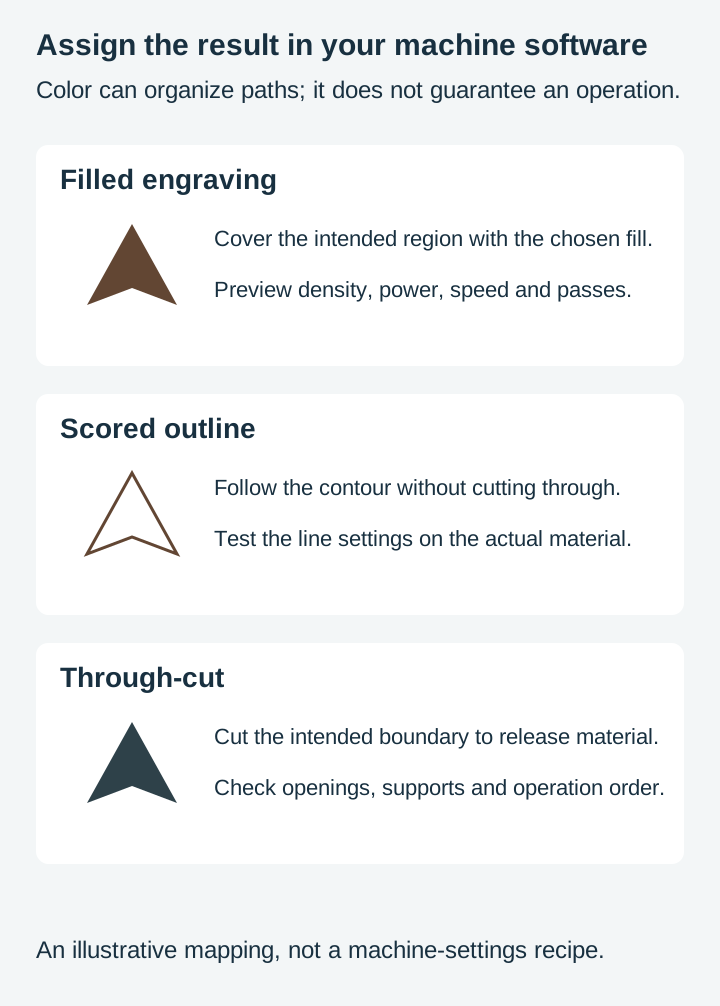
The artwork alone does not specify a reliable manufacturing process. Import rules may use colors or layers as a starting point, but you must assign and verify the actual operations and settings in the destination software.
Tip
Short answer: engraving fills an area, scoring marks a line, cutting goes through. The difference lives in your machine settings, but which line gets which operation is decided in the file, usually by colour or by layer. A single-color design may still contain separately assignable objects, so inspect the imported geometry and operation list.
Three operations, one design
Worth separating cleanly, because the words get used loosely.
Engraving, in the sense meant here, marks or removes material across an area. The result is a filled shape: a solid block, a shaded region, a photograph rendered in dots. The tool covers the whole region, usually by sweeping back and forth across it. This is sometimes called raster or fill engraving, to distinguish it from vector engraving, which follows lines and is much the same idea as scoring. The terminology varies by manufacturer, so check what your own software means by the word.
Scoring marks a single line without going through. A fold line on a card, a decorative outline, a division between two areas of a design. On a laser, the beam follows a path at settings intended to mark rather than sever. Pass counts and terminology depend on the workflow.
Cutting goes all the way through and separates material.
On a laser, all three are the same beam at different power and speed settings, with operation assignments and settings controlled in the machine software. On a CNC the operation decides the toolpath and usually the cutter as well, not simply how deep a single pass goes. Cutting machines are different again: Cricut scores with a dedicated scoring wheel or stylus and cuts with a blade, so there the operation decides which tool goes in the housing.
That is why the file matters so much. Assuming your machine can do all three, and not every machine can, since engraving on a cutting machine needs a model and a tool that support it, your operation assignments still need to communicate which result you intend.
How the file says which is which
This is the part that actually causes the problems, and it is entirely a design-side question.
Cutting software separates operations by something in the file. Which something depends on the program, and there are three common conventions.
By stroke or fill colour. The most widespread. Distinct colors can become separate operation groups, depending on importer rules. A design with red cut lines, blue score lines and black engraved areas gives the software three groups to assign.
By named layer. Some workflows separate by layer name instead, so a layer called Cut and a layer called Score arrive as distinct operations.
By line weight. Less common, and worth knowing mostly because it explains why hairline strokes sometimes behave differently from thicker ones.
The consequence is the same in all three cases. Color may organize operations or represent the finished appearance. Confirm which convention the file and importer use. A design where every path is black carries no separation of its own, so the file is telling the software nothing. You can still assign operations by hand afterwards, since Cricut lets you set an operation per layer and LightBurn lets you move selected objects onto another layer, but you are now doing the sorting the file should have done, on a design you did not draw.
Our layers guide covers how those conventions differ between programs.
 Arrowhead Designs30 designs, commercial license included$3.99
Which operation does a line want
The practical question. Work through it in this order.
Does this line define the edge of a piece? Then it cuts. The outer boundary, and any interior opening that is meant to be a hole, are cuts.
Does the material need to fold here? Use the supported scoring method for that stock. A card crease and a laser mark in rigid plywood are not equivalent; scoring wood does not automatically create a usable fold.
Is this line decoration on a surface that stays whole? Then it is either a score or an engrave, and the choice is aesthetic. A scored line is fine and fast. An engraved line has width and reads more deliberately.
Is this an area rather than a line? Then it engraves, and you should think about how large that area is before you commit, because area is time.
Is this small interior detail? Check whether it is intended as a surface mark or an opening, then inspect the remaining material. Fine cut detail may need simplification or a backing. Our post on detail and small items covers where that line falls.
The same design, three ways
This is the useful mental model: one drawing can become three quite different objects.
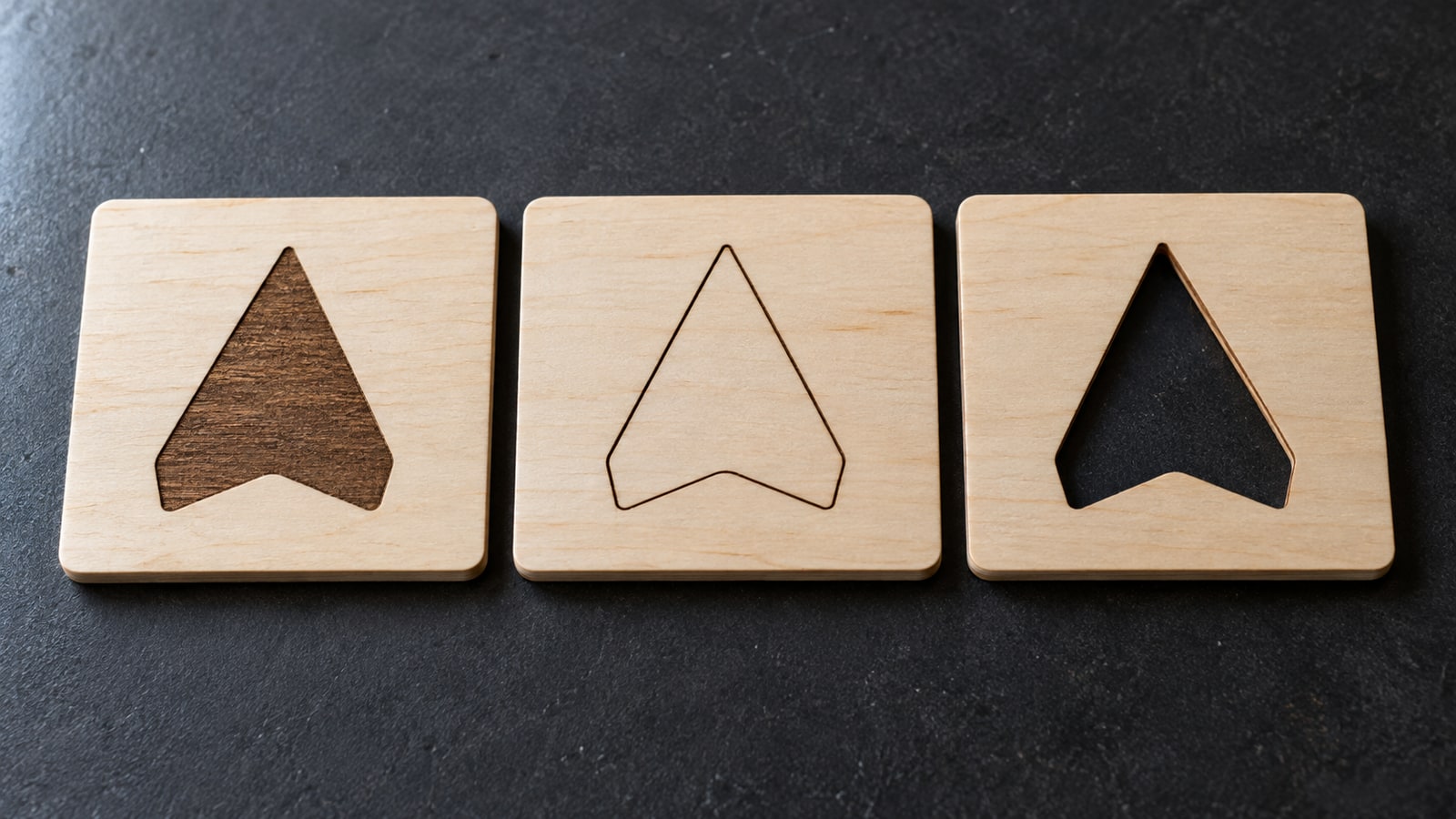
Take a paw print. Cut through a plywood tag, it is a hole in the shape of a paw and the tag is a frame. Engraved, it is a dark solid paw on an intact tag. Scored, it is a fine outline of a paw, subtle enough that you notice it close up and not from across a room.
None of those is the correct answer. They are three products, and which one you want depends on the material, the size, and the piece.
The mistake worth avoiding is assuming a design has one intended operation. Inspect the specific design: engraving artwork may need structural changes before it can become a freestanding cut piece.
 North American Predator Paw Prints30 designs, commercial license included$3.99
Where it goes wrong
Four failure modes, in rough order of how expensive they are.
Operation groups were not checked. A single-color import may need sorting, while a multicolor import can still have incorrect assignments. Inspect every group and its settings in the preview.
Interior detail set to cut. Fine internal lines that were meant as surface decoration, cut through instead. On a laser you get a lacework that falls apart. On vinyl you get something impossible to weed.
A stray path in the cut layer. A leftover node or a duplicated outline sitting in the cut group, so the machine makes a cut you did not ask for. Our pre-flight checklist covers finding those.
Engraving something that should have been cut. Less destructive and much slower. A shape that would have taken thirty seconds as an outline takes many minutes as a solid fill, and you find out by watching it.
Time and area
Worth understanding as a design consideration rather than a machine one.
A cut follows a path, once if the material allows it and several times if it does not, since multiple passes are normal on thicker stock and standard practice for CNC depth steps. An engrave has to cover a region, sweeping back and forth across it. For a filled laser engraving, area and scan layout contribute to runtime; for a contour cut, path length and pass strategy matter. Acceleration, travel and overscan add overhead.
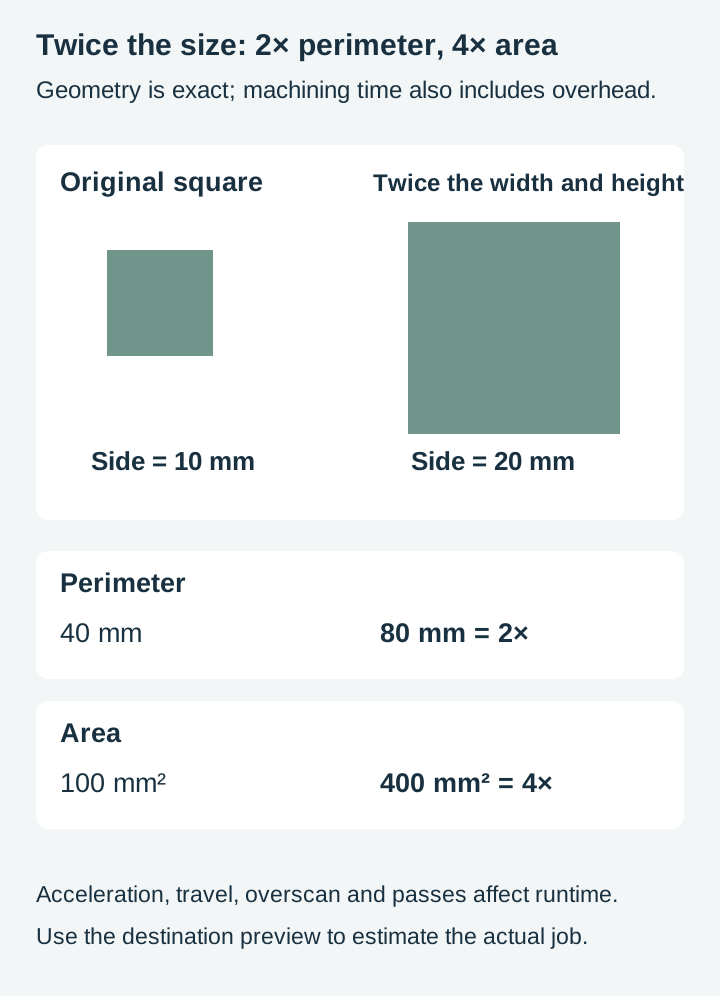
Double a design's width and height and its outline roughly doubles in length while its area roughly quadruples, which suggests different scaling with unchanged settings. Actual runtime does not follow that ratio exactly because travel, acceleration, overscan and pass strategy also contribute.
This is why a large solid engraved background is such an expensive design decision, and why the same subject rendered as line art is usually much faster. How much faster depends on the design, the machine, the material and the settings, so the only number that means anything is the one your own machine gives you. It is also why our burn marks post leads with solid fill area: more engraving means more smoke as well as more time.
Combining all three
Combine operations when each contributes something useful to the piece.
A typical assembled piece cuts its outer profile, scores where it folds, and engraves the detail on the face. A layered sign cuts each layer's outline and engraves the text on the top layer only. A box cuts the panels and the finger joints, scores nothing, and engraves a logo on the lid.
The order matters too. Engrave before you cut, so the piece is still held in the sheet while the detailed work happens. Once a part is cut free it can shift, and anything engraved after that lands in the wrong place.
Where to start
Open a file you have used before and count the distinct colours in it. If the answer is one, and the design has anything in it other than a plain outline, you have found something worth looking at before you cut it again.
Then try the same design three ways on scrap: cut, scored, engraved. It costs one offcut and it tells you more about what a design can be than any amount of reading.
Our designs ship as SVG, PNG, JPG, PDF, and EPS. Assign the intended operations after importing the appropriate file and confirm them in the destination software’s preview. Browse the full catalogue at $3.99 a pack, commercial license included with every purchase and no cap on how many physical products you sell.
Designs for this project
Frequently Asked Questions
What is the difference between scoring and engraving?
Engraving removes or marks a whole area, so it produces a filled shape. Scoring marks a single line without going through the material. On a laser, the same beam can perform both with the appropriate toolpath and settings. Cricut scoring uses a dedicated wheel or stylus, and its engraving tools follow their own supported workflows.
Why did my machine cut through a line that was meant to be scored?
Check the assigned operation, power, speed, passes, focus and material. Color or layers can help organize paths, but even a correctly assigned score can cut through if the settings put too much energy into the material.
Does it take longer to engrave than to cut?
Usually yes, and often by a lot. A cut follows an outline, once on thin material and several passes on thicker stock. An engrave has to cover an area, which means sweeping back and forth across the whole region. A design that is mostly solid fill can take many times longer than the same design cut as an outline.
Can one design use all three operations?
Yes, when the machine and material support the intended result. A piece can have a cut perimeter, scored decoration and engraved areas. Assign and preview each operation; a good project does not need all three.